Convert a bank statement to Google Sheets
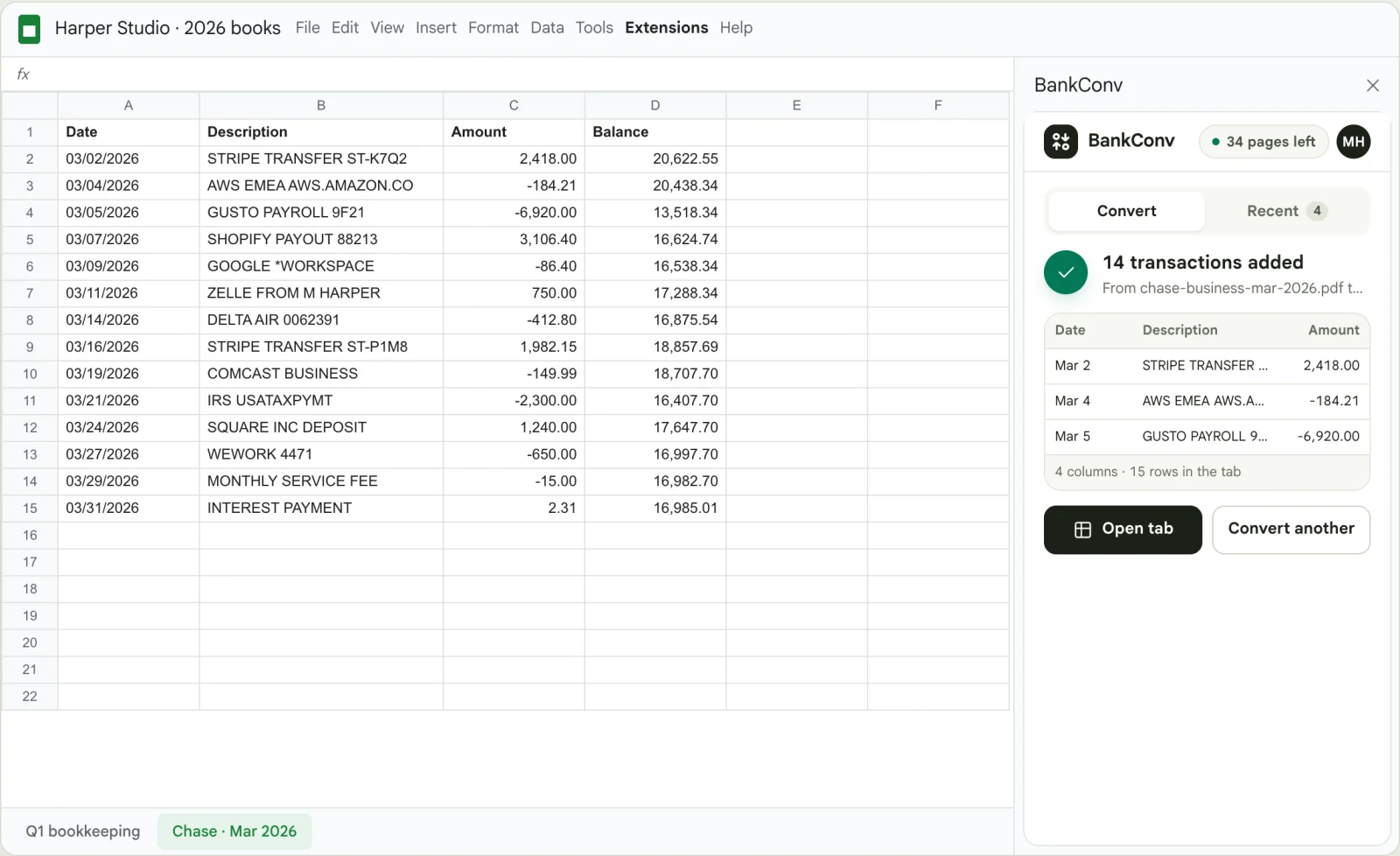
Install the free BankConv add-on from the Google Workspace Marketplace, open it in a Google Sheet, and drop in the PDF statement. The transactions land in a new tab of that spreadsheet, one row each with date, description, amount and balance, ready to share with a bookkeeper or accountant.
How to get a bank statement into Google Sheets
- 1.Download the statement PDF from your bank.
- 2.Install BankConv for Google Sheets from the Google Workspace Marketplace.
- 3.In any Google Sheet, go to Extensions → BankConv for Google Sheets → Convert bank statement, and sign in with your Google account.
- 4.Drop the PDF into the sidebar and click Convert to sheet. The transactions land in a new tab.
- 5.Check the rows against the PDF, then share the spreadsheet.
Want the full setup, permissions and costs first? Read about the Google Sheets add-on
What the Google Sheets file looks like
The same sample statement in each format. Switch to compare.
Excel
A standard .xlsx workbook with one row per transaction.
Best for: Analysis, pivot tables, loan and tax paperwork.
Bank statement to Excelharbor-pine-sep-2026.xlsx
Sample
| A | B | C | D | |
|---|---|---|---|---|
| 1 | Date | Description | Amount | Balance |
| 2 | 2026-09-01 | Card purchase · Adobe Creative Cloud | −59.99 | 8,352.38 |
| 3 | 2026-09-02 | Stripe transfer · ST-7Q2KX | 2,486.50 | 10,838.88 |
| 4 | 2026-09-03 | ACH debit · Gusto payroll | −4,120.00 | 6,718.88 |
| 5 | 2026-09-05 | Check 1043 | −1,850.00 | 4,868.88 |
| 6 | 2026-09-09 | Card purchase · AWS EMEA | −218.77 | 4,650.11 |
| 7 | 2026-09-12 | Deposit · Mobile check | 1,200.00 | 5,850.11 |
CSV
Plain comma-separated rows any tool can import.
Best for: Importing into accounting software, budgeting apps and databases.
Bank statement to CSVharbor-pine-sep-2026.csv
Sample
Date,Description,Amount,Balance
2026-09-01,Card purchase · Adobe Creative Cloud,-59.99,8352.38
2026-09-02,Stripe transfer · ST-7Q2KX,2486.50,10838.88
2026-09-03,ACH debit · Gusto payroll,-4120.00,6718.88
2026-09-05,Check 1043,-1850.00,4868.88
2026-09-09,Card purchase · AWS EMEA,-218.77,4650.11
2026-09-12,Deposit · Mobile check,1200.00,5850.11
Google Sheets
Added as a new tab in your spreadsheet by the free add-on.
Best for: Sharing with a bookkeeper or working from any browser.
Bank statement to Google SheetsHarbor & Pine · Sep 2026 (Google Sheets)
Sample
| A | B | C | D | |
|---|---|---|---|---|
| 1 | Date | Description | Amount | Balance |
| 2 | 2026-09-01 | Card purchase · Adobe Creative Cloud | −59.99 | 8,352.38 |
| 3 | 2026-09-02 | Stripe transfer · ST-7Q2KX | 2,486.50 | 10,838.88 |
| 4 | 2026-09-03 | ACH debit · Gusto payroll | −4,120.00 | 6,718.88 |
| 5 | 2026-09-05 | Check 1043 | −1,850.00 | 4,868.88 |
| 6 | 2026-09-09 | Card purchase · AWS EMEA | −218.77 | 4,650.11 |
| 7 | 2026-09-12 | Deposit · Mobile check | 1,200.00 | 5,850.11 |
OFX
Open Financial Exchange, the bank-feed format.
Best for: QuickBooks, Xero, Sage and most accounting software.
Bank statement to OFXharbor-pine-sep-2026.ofx
Sample
OFXHEADER:100
DATA:OFXSGML
VERSION:102
…
<OFX>
  <BANKTRANLIST>
    <STMTTRN>
      <TRNTYPE>DEBIT
      <DTPOSTED>20260901
      <TRNAMT>-59.99
      <FITID>02d4e626…
      <NAME>Card purchase · Adobe Creative C
    </STMTTRN>
    <STMTTRN>
      <TRNTYPE>CREDIT
      <DTPOSTED>20260902
      <TRNAMT>2486.50
      <FITID>755d799c…
      <NAME>Stripe transfer · ST-7Q2KX
    </STMTTRN>
    <STMTTRN>
      <TRNTYPE>DEBIT
      <DTPOSTED>20260903
      <TRNAMT>-4120.00
      <FITID>c277c427…
      <NAME>ACH debit · Gusto payroll
    </STMTTRN>
  </BANKTRANLIST>
  <LEDGERBAL><BALAMT>5850.11
</OFX>harbor-pine-sep-2026.qfx
Sample
OFXHEADER:100
DATA:OFXSGML
VERSION:102
…
<OFX>
  <SIGNONMSGSRSV1> … <INTU.BID>3000 …
  <BANKTRANLIST>
    <STMTTRN>
      <TRNTYPE>DEBIT
      <DTPOSTED>20260901
      <TRNAMT>-59.99
      <FITID>02d4e626…
      <NAME>Card purchase · Adobe Creative C
    </STMTTRN>
    <STMTTRN>
      <TRNTYPE>CREDIT
      <DTPOSTED>20260902
      <TRNAMT>2486.50
      <FITID>755d799c…
      <NAME>Stripe transfer · ST-7Q2KX
    </STMTTRN>
    <STMTTRN>
      <TRNTYPE>DEBIT
      <DTPOSTED>20260903
      <TRNAMT>-4120.00
      <FITID>c277c427…
      <NAME>ACH debit · Gusto payroll
    </STMTTRN>
  </BANKTRANLIST>
  <LEDGERBAL><BALAMT>5850.11
</OFX>
QBO
QuickBooks Web Connect: OFX with Intuit fields.
Best for: QuickBooks Desktop, and QuickBooks Online uploads.
Bank statement to QBOharbor-pine-sep-2026.qbo
Sample
OFXHEADER:100
DATA:OFXSGML
VERSION:102
…
<OFX>
  <SIGNONMSGSRSV1> … <INTU.BID>3000 …
  <BANKTRANLIST>
    <STMTTRN>
      <TRNTYPE>DEBIT
      <DTPOSTED>20260901
      <TRNAMT>-59.99
      <FITID>02d4e626…
      <NAME>Card purchase · Adobe Creative C
    </STMTTRN>
    <STMTTRN>
      <TRNTYPE>CREDIT
      <DTPOSTED>20260902
      <TRNAMT>2486.50
      <FITID>755d799c…
      <NAME>Stripe transfer · ST-7Q2KX
    </STMTTRN>
    <STMTTRN>
      <TRNTYPE>DEBIT
      <DTPOSTED>20260903
      <TRNAMT>-4120.00
      <FITID>c277c427…
      <NAME>ACH debit · Gusto payroll
    </STMTTRN>
  </BANKTRANLIST>
  <LEDGERBAL><BALAMT>5850.11
</OFX>
Why convert to Google Sheets
- A new tab for each statement
- Each statement goes into its own tab, named after the bank and period. Your other tabs are left alone.
- Ready to share
- Send a link to your bookkeeper or accountant instead of emailing PDFs back and forth.
- Limited to that spreadsheet
- Google only lets the add-on see and edit the spreadsheet it was opened in. The PDF comes from your computer, not from Drive.
Working with statement data in Google Sheets
Sheets makes statement data easy to share and review together.
- 1Share the sheet with your bookkeeper as a commenter so they can flag transactions without editing them.
- 2Add a Category column with a dropdown (Data → Data validation) to classify expenses.
- 3Use =QUERY() to total spending by category or by month.
- 4Freeze the header row (View → Freeze) so column names stay visible on long statements.
Popular banks
All banksOther formats
- Bank statement to Excel · Analysis, pivot tables, loan and tax paperwork.
- Bank statement to CSV · Importing into accounting software, budgeting apps and databases.
- Bank statement to OFX · QuickBooks, Xero, Sage and most accounting software.
- Bank statement to QFX · Quicken for Windows and Mac.
- Bank statement to QBO · QuickBooks Desktop, and QuickBooks Online uploads.
Google Sheets questions
Is the add-on free?
Installing it is free. Converting uses your BankConv pages, the same as on the website. A new account's first statement converts free, up to 5 pages.
Can I do this without the add-on?
Yes. Convert the PDF with the converter on this page, check the rows, and download Excel or CSV. Then open the file in Google Sheets with File → Import.
Do I need a Google account?
Yes, to use Google Sheets and the add-on. Without one, download Excel or CSV from the converter on this page instead.
Can I add several statements to one sheet?
Yes. Each conversion adds a new tab, so a year of statements can sit in one spreadsheet. For one long list, copy the rows under each other: statements from the same bank share the same columns.
Your statement's data
Deleted after 24 hours
Your PDF and its converted files are deleted automatically. Account owners can choose 48 or 72 hours instead.
Read only to extract transactions
Your statement is read (with OCR for scans) to pull out the transaction rows you download.
Encrypted in transit
Uploads and downloads use HTTPS (TLS).
Passwords never stored
The password of a protected PDF is used once to open the file.
No bank login
BankConv works from the PDF you download, never from a connection to your bank.